If you have encountered 401 vs 403 while working with websites, APIs, or HTTP status codes, you may wonder what these two errors mean. Both codes tell you that a server will not complete a request, but they point to different access problems. Knowing the difference can help you troubleshoot authentication and permission issues faster.
The simplest way to remember the difference is this: 401 Unauthorized usually means that the server cannot authenticate the request, while 403 Forbidden means that the server understands the request but refuses to grant access. Developers commonly encounter these codes when they build websites, APIs, login systems, and protected resources.
Quick Answer
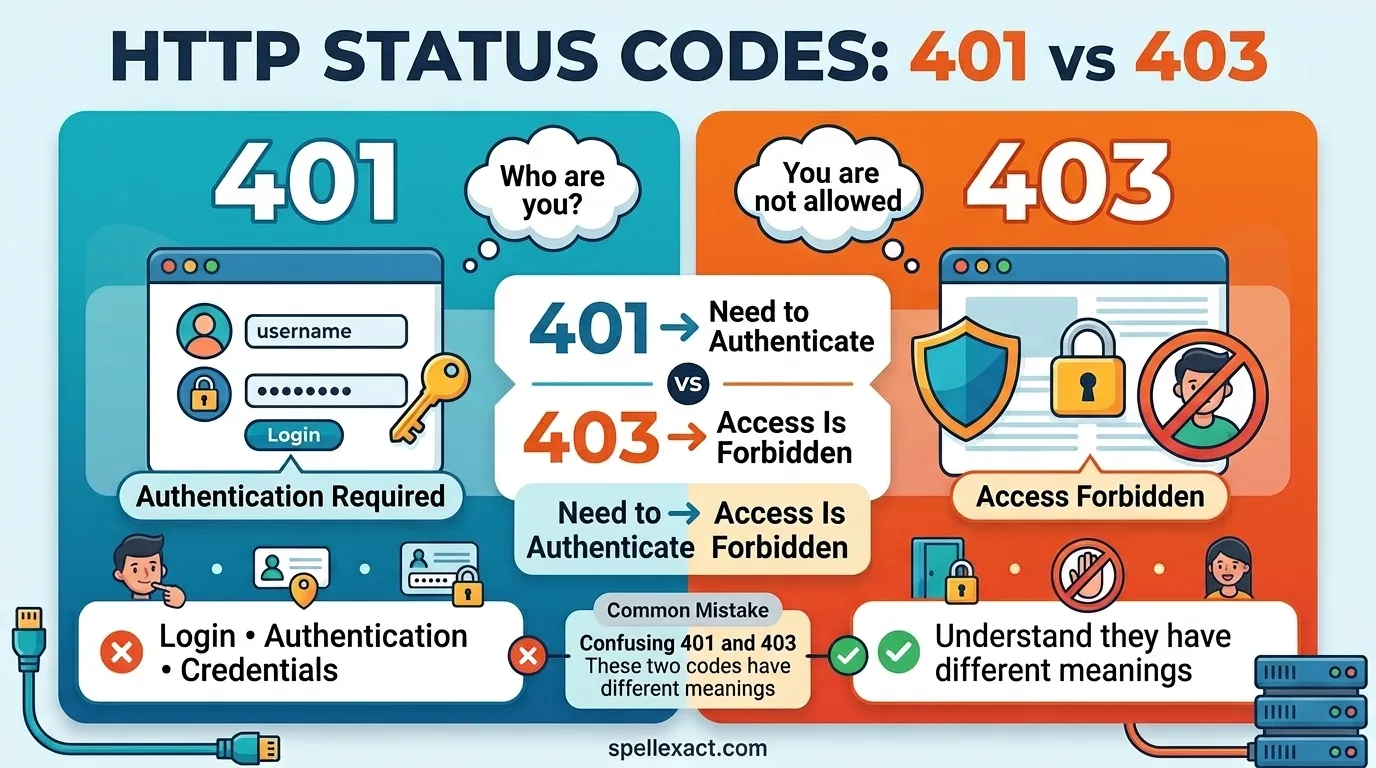
401 Unauthorized usually means the client has not provided valid authentication credentials. 403 Forbidden means the server understands the request but refuses to authorize access. In simple terms, 401 usually concerns authentication, while 403 usually concerns authorization and permissions.
Why Do People Confuse 401 and 403?
People often confuse 401 and 403 because both errors prevent a client from accessing a resource.
However, the two codes point to different parts of the access process:
- 401 Unauthorized: The server cannot successfully authenticate the request.
- 403 Forbidden: The server understands the requester but refuses the requested access.
- 401: Think about login credentials or authentication.
- 403: Think about permissions or authorization.
For example, imagine an online dashboard that requires users to log in. If you send a request without valid credentials, the server may return 401. If you successfully log in but your account lacks permission to open an administrator page, the server may return 403.
What Does 401 Unauthorized Mean?
401 Unauthorized tells the client that the server needs valid authentication credentials before it can provide the requested resource. The HTTP specification uses this status when a request lacks valid authentication credentials. Learn more about 401 Unauthorized on MDN Web Docs
The name can cause some confusion. A 401 response does not necessarily mean that the server permanently denies access. Instead, the client may need to authenticate correctly before the server processes the request.
A server may return 401 when:
- You provide no authentication credentials.
- You provide incorrect credentials.
- Your access token has expired.
- Your access token contains invalid information.
- You send an invalid authentication header.
- The server cannot validate your authentication information.
Example of 401
Suppose an API requires a valid bearer token. You send a request with an invalid token:
GET /api/profile
Authorization: Bearer invalid-token
The server may respond:
401 Unauthorized
You may need to log in again, obtain a new token, refresh the expired token, or correct the authentication information.
What Does 403 Forbidden Mean?
403 Forbidden tells you that the server understands your request but refuses to give you access to the requested resource.
The server may recognize your identity, but your account may not have enough permission to complete the requested action.
A server may return 403 when:
- Your account lacks the required permission.
- Your role cannot access the resource.
- You try to open a restricted page.
- A security rule blocks your request.
- A server configuration denies access.
- You cannot perform a particular action with your current privileges.
Example of 403
Imagine that you work for a company and log into its internal website successfully. You then try to open an administrator-only page.
The website recognizes your account, but your account does not have administrator privileges.
The server may return:
403 Forbidden
Logging in again will usually not solve the problem because your account still lacks the necessary permission.
401 vs 403: Comparison Table
| Feature | 401 Unauthorized | 403 Forbidden |
| Main meaning | The server cannot authenticate the request | The server refuses the requested access |
| Main issue | Authentication | Authorization |
| Credentials | Missing, invalid, or expired credentials may cause the error | Valid credentials may still lead to the error |
| Can logging in help? | Often | Usually not |
| Common cause | Missing or invalid token | Insufficient permissions |
| Typical example | Expired access token | User tries to access an admin page |
| HTTP category | 4xx Client Error | 4xx Client Error |
| Easy memory | “Authenticate first” | “Access denied” |
When Should You Use 401?
Use 401 Unauthorized when the client needs to authenticate successfully before it can access the requested resource.
For example, an API endpoint may require a valid authentication token. If the client sends no token or sends an invalid or expired token, the server can return 401.
Common situations include:
- The user has not logged in.
- The request lacks an authentication header.
- The authentication token has expired.
- The credentials are invalid.
- The API requires authentication.
- The server cannot verify the supplied credentials.
A simple way to think about 401 is:
“The server needs valid authentication before it can continue.”
When Should You Use 403?
Use 403 Forbidden when the server understands the request but refuses to authorize the requested action or resource.
For example, a user may successfully log into an application but still lack permission to access its administration section.
Common situations include:
- A user lacks the required role.
- A user does not have permission to access a resource.
- An account cannot perform a specific action.
- A security policy blocks the request.
- Server rules deny access to a resource.
- A restricted area only allows certain users.
A simple way to think about 403 is:
“The server understands the request, but the requester cannot access this resource.”
401 vs 403: 10+ Examples
Example 1: Missing Login
You try to access a protected API without authentication credentials.
Likely response: 401 Unauthorized
Example 2: Expired Token
Your access token has expired, so the server cannot authenticate your request.
Likely response: 401 Unauthorized
Example 3: Invalid Credentials
You send authentication credentials that the server cannot validate.
Likely response: 401 Unauthorized
Example 4: Regular User Opens an Admin Page
You successfully log in, but your account does not have administrator privileges.
Likely response: 403 Forbidden
Example 5: Restricted File
You request a file that your account cannot access.
Likely response: 403 Forbidden
Example 6: Insufficient Role
An application lets managers view a particular report, but ordinary employees cannot access it.
Likely response: 403 Forbidden
Example 7: Missing API Authentication
An API requires an authentication header, but your request does not include one.
Likely response: 401 Unauthorized
Example 8: Authenticated but Blocked
The server successfully identifies your account, but a security rule prevents your account from accessing a particular resource.
Likely response: 403 Forbidden
Example 9: Expired Session
Your website session has expired, so the server cannot authenticate your request.
Likely response: 401 Unauthorized
Example 10: Protected Administration Function
You log into an application but try to delete information that only administrators can delete.
Likely response: 403 Forbidden
Example 11: Permission-Based API Access
The API successfully identifies you, but your account does not have permission to use a particular endpoint.
Likely response: 403 Forbidden
Common Mistakes With 401 and 403
Many people treat 401 and 403 as interchangeable because both errors can stop a request. However, they describe different access-control situations.
Mistake 1: Treating 401 and 403 as the Same Error
Both codes belong to the 4xx category, but they address different problems.
401 focuses on authentication.
403 focuses on authorization and access.
Mistake 2: Assuming 401 Always Means a Wrong Password
A 401 response does not necessarily mean that you entered the wrong password.
The server may return 401 because you:
- Forgot to provide credentials.
- Used an expired token.
- Sent an invalid token.
- Provided authentication information that the server cannot validate.
Mistake 3: Assuming 403 Always Means You Are Logged In
A 403 response mainly tells you that the server refuses the requested access. Different applications can implement authentication and authorization differently.
Mistake 4: Trying to Log In Repeatedly After a 403
If your account lacks the required permission, logging in again will not normally give your account additional privileges.
You need the appropriate role or permission.
Mistake 5: Calling 403 an Authentication Error
Authentication answers one question:
“Who are you?”
Authorization answers another:
“What can you access or do?”
That distinction makes 401 and 403 much easier to understand.
Memory Trick: 401 vs 403
Use this simple memory trick:
401 = “Authenticate me.”
403 = “Access denied.”
You can also remember them through two questions:
- 401: “Who are you?”
- 403: “I know who you are, but can you access this?”
When you remember authentication vs authorization, you can usually identify the correct status code quickly.
American vs British English
American and British English do not use different numbers for these HTTP status codes.
However, the spelling of unauthorized differs between the two varieties of English:
- American English: 401 Unauthorized
- British English: 401 Unauthorised
British English commonly uses -ise or -ised spellings in words such as “authorised,” while American English generally uses -ize or **-ized.”
The status code remains 401 in both varieties.
The word Forbidden has the same spelling in American and British English.
Similar Words and Concepts
Several related terms can help you understand the difference between 401 and 403.
Authentication
Authentication verifies the identity of a user, application, or client.
Common authentication methods include:
- Username and password
- Access tokens
- API keys
- Session credentials
- Multi-factor authentication
Authorization
Authorization determines what an authenticated user or client can access or do.
For example, an application may authenticate an employee successfully but prevent that employee from accessing administrator tools.
Permission
A permission defines an action or resource that a user, role, or application can access.
For example, an administrator may have permission to delete users while a regular employee may not.
Access Denied
Access denied describes a general situation where a server refuses access.
The phrase itself does not tell you whether authentication, authorization, security rules, or another condition caused the problem.
Final Verdict
The main difference between 401 and 403 comes down to authentication and authorization.
401 Unauthorized generally indicates that the server cannot successfully authenticate the request. 403 Forbidden indicates that the server understands the request but refuses to grant the requested access.
When you troubleshoot a 401 error, check your credentials, authentication headers, tokens, and sessions. When you troubleshoot a 403 error, check your permissions, roles, resource restrictions, and security rules.
FAQs
Is 401 or 403 worse?
Neither status code is inherently worse. Each code describes a different access problem. A 401 usually points to authentication, while a 403 usually points to authorization or access restrictions.
Can logging in fix a 401 error?
Often, yes. If the server returns 401 because you have not authenticated successfully, logging in or providing valid credentials may resolve the problem.
Can logging in fix a 403 error?
Usually, logging in alone will not fix a 403 error. If your account lacks the required permission, you need the appropriate role or access rights.
What is the main difference between authentication and authorization?
Authentication verifies identity. Authorization determines access.
For example, a website can authenticate you as a user but still prevent you from opening an administrator page.
Does 401 mean I entered the wrong password?
Not necessarily. A server can return 401 for several authentication problems, including missing credentials, invalid tokens, expired tokens, or credentials that the server cannot validate.
Does 403 mean I am logged in?
Not necessarily. A 403 response tells you that the server refuses the requested access. The exact authentication behavior depends on the application and its access-control system.
Which error relates to permissions: 401 or 403?
403 Forbidden generally relates to authorization and permissions. 401 Unauthorized generally relates to authentication.
Are 401 and 403 HTTP errors?
Yes. Both 401 and 403 belong to the 4xx HTTP client error category.
Remember This
401 = authentication problem.
403 = authorization or access problem.
If the server needs valid credentials, think 401.
If the server understands your request but refuses to give you access, think 403.
Conclusion
The difference between 401 and 403 becomes much easier to understand when you separate authentication from authorization. A 401 response generally means that the server cannot successfully authenticate the request, while a 403 response means that the server refuses the requested access.
When you troubleshoot a 401, check your credentials, tokens, authentication headers, and sessions. When you troubleshoot a 403, check your permissions, roles, resource restrictions, and security rules. Remember “401 = authenticate” and “403 = forbidden access” to quickly distinguish the two status codes.

Andrew Anthony is a language enthusiast and content writer specializing in spelling mistakes, grammar, and English usage. He creates clear, practical, and well-researched guides that help readers improve their writing skills with confidence.